
What is a Prompt? A Simplified Beginner’s Guide to AI
Learn exactly what is a prompt, why it’s the secret to AI, and how to write perfect ones. Stop settling for bad results—read the ultimate beginner’s guide now!
Have you ever tried using an AI tool like ChatGPT, Claude, or Gemini, only to receive an answer that was vague, incorrect, or completely missed the point?
It’s a common and frustrating experience. You think you’ve asked a clear question, but the AI behaves as if it doesn’t speak your language.
The reason for this isn’t that the AI is “dumb.” In fact, today’s AI models are incredibly powerful. The reason is usually much simpler: your prompt wasn’t optimized.
In this definitive guide, we will break down exactly what a prompt is, why it is the fundamental key to unlocking AI productivity, and how you can stop guessing and start writing perfect prompts from day one.

Image #1: The Human Interface. This image depicts a professional intuitively communicating with an AI via a clean digital interface. Our prompts are the only bridge between human intention and AI execution.
What is a Prompt? The Simple Definition
At its core, a prompt is any input given to an AI model to tell it what to do.
It is your command, your instruction, your conversation starter, and your question, all rolled into one. When you type into ChatGPT, you are not “searching” a database (like you do on Google); you are interacting with a complex statistical model that predicts the next best words based entirely on the instructions you provide.
A prompt can be as simple as:
“Write a poem about rain.”
Or it can be as complex as:
“Act as a professional SEO copywriting expert. Review the following 5 competitors’ articles on ‘What is a Prompt.’ Analyze their content structure, keyword usage, and tone. Then, generate a unique, engaging 1,500-word article structure in English that is optimized to outrank them. Focus on beginner clarity, actionability, and including 3 key Pro Tips not mentioned by competitors.”
The Key Takeaway: Garbage In, Garbage Out
Think of AI as an incredibly talented, infinitely knowledgeable assistant who is also completely literal and lacks common sense.
If you give your assistant vague instructions, you get vague results. If you provide a precise, context-rich, and structured prompt, you get spectacular, ready-to-use output. Understanding exactly what is a prompt is the fundamental difference between people who view AI as a toy and those who use it to save 20 hours a week.
Why are Prompts Necessary? (They Aren’t Just for Fun)
You might ask, “If AI is so smart, shouldn’t it just know what I mean?”
The reality is that prompts are necessary because Generative AI operates on probability, not consciousness. Models like ChatGPT, Claude, and Grok are Large Language Models (LLMs). They have read vast amounts of data and learned the relationships between words. When you give them a prompt, they use that data to calculate the most likely sequence of words to satisfy your input.
Prompts are the mandatory steering wheel. Without them, the AI has infinite power but zero direction.
A strong, structure-based prompt provides critical information:
- Context: What situation are we dealing with?
- Role/Persona: Who should the AI pretend to be?
- Tone/Style: How should the AI sound?
- Constraints: What must the AI avoid?
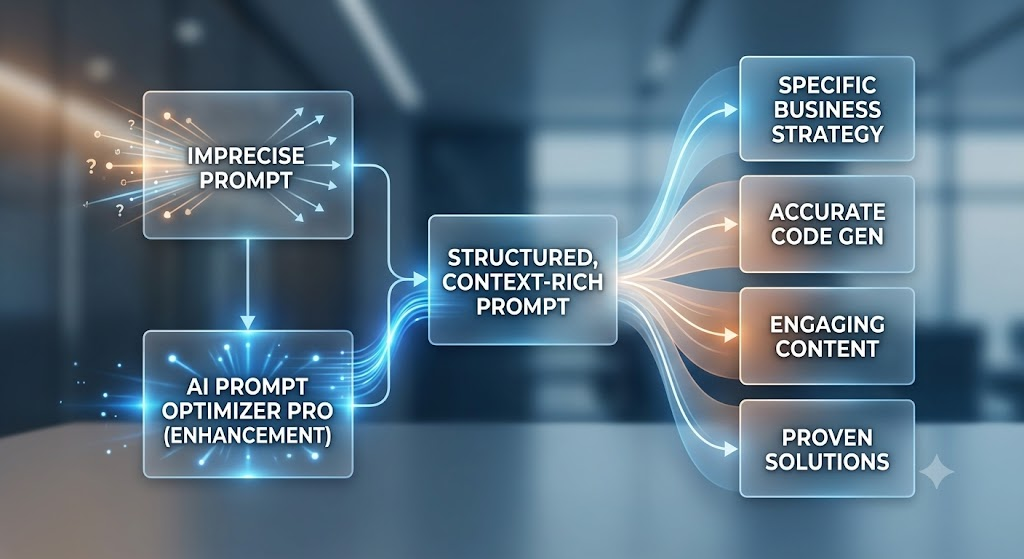
Image #2: Input vs. Output. A visual representation showing that imprecise prompts (left) yield vague or fragmented results. Structured, context-rich prompts (right)—enhanced by optimization—yield specific, professional, and ready-to-use business solutions.
4 Easy Steps to Write Your First Optimized Prompt
Now that you understand the “what” and the “why,” let’s master the “how.” For beginners, writing great prompts doesn’t require a programming degree. You just need a simple formula.
The most effective beginner formula is C-R-E-A-T-E:
1. C: Context & Core Task
Begin by clearly stating the core task and providing the relevant background. What must be written, and why?
Example: “Write a 500-word product description for a new wireless charging pad.”
2. R: Role & Persona
Tell the AI who it needs to be. This instantly sets the expertise Level.
Example: “Act as a senior marketing copywriter specializing in high-end tech accessories.”
3. E: Examples (Optional but powerful)
If you want a specific style, provide a sample paragraph of your preferred tone or structure. This is called “Few-Shot Prompting.”
4. A: Audience & Tone
Who is this for? Should it be professional, casual, witty, or authoritative?
Example: “The target audience is tech-savvy millennials who value sleek design. The tone should be modern, energetic, and concise.”
5. T: Format & Constraints
Define the exact output format you need (e.g., HTML, bullet points, narrative, email structure) and any negative constraints (what to avoid).
Example: “Present the final output in clean HTML with an H2 title, bullet points for features, and a bold paragraph for the Call-to-Action. Avoid jargon.”
6. E: ENHANCE Instantly (The Secret Shortcut)
Manually crafting these structures for every single interaction can be exhausting. If you want the fastest route to professional results, this is the step you cannot skip.
Before sending your basic prompt structure to ChatGPT, paste it into a dedicated optimization tool. For instance, you can enhance your ChatGPT prompts instantly by using a specialized prompt generator that knows the ideal structure for every AI model. This turns your 20-word idea into a 200-word professional engineering instruction, ensuring spectacular results on your very first try.
A Message to Our Readers: Don’t Waste Your AI Potential
You are already paying (or will pay) for powerful AI models. Why are you settling for average output? The most common reason new users abandon AI is frustration with bad results. You canoptimize your prompts for free using AI Prompt Optimizer Proand guarantee that your interactions with ChatGPT, Claude, and Gemini are productive, precise, and professional.
Pro Tips vs. Common Beginner Mistakes
Mastering AI is often about avoiding simple traps. Here is what separates beginners from power users:
Common Mistakes to Avoid (The “Garbage In”)
- Being Vague: Example: “Help me write a blog.” (The AI has no idea of your niche, audience, or goal.)
- Using Complex Jargon (Ironically): While literal, AIs are sometimes confused by overly technical terms when simple, declarative sentences would do.
- Mixing Multiple Complex Tasks: Never ask the AI to write a blog, analyze data, and create a marketing strategy in a single prompt. Breakthrough complex tasks into sequential interactions.
- Accepting the First Draft: Beginners take the first output. Power users view the first output as a “rough draft” and provide critique to improve it iteratively.
Pro Tips for Success (The “Master Class”)
- Iterative Prompting: If the AI fails, don’t restart. Use dialogue: “That was too professional. Try again, making it sound more like a conversation between friends.”
- The “Act As” Command: This is the Single most effective hack for beginners. Always set a persona. Act as a lawyer, Act as a kindergarten teacher, Act as a historical novelist.
- Delimiters: Use delimiters like triple quotes
"""or brackets[]to separate your instructions from the text you want the AI to analyze. Example: “Summarize the text inside these brackets: [Pasted Text]” - Instant Optimization: Skip the learning curve. If you have an important task, don’t risk bad results. Use a free tool to build the structure for you. Beginners should always try our free AI prompt optimizer tool to generate structurally sound instructions instantly.

Image #3: Empowered Creativity. The result of mastered prompts. An inspired professional successfully interacting with optimized knowledge streams, signifying productivity and confident AI engagement.
Your Step-by-Step Path to AI Prompt Mastery (H2)
AI is the most transformative technology of our lifetime, and you now have the conceptual key to its kingdom. Learning exactly what is a prompt is the first, most important skill in the 21st-century digital landscape.
Here is your summary of the path forward:
- Understand: Vague instructions get bad results. Specificity is king.
- Practice: Use the C-R-E-A-T-E framework to build your basic structure.
- Iterate: Your first prompt is a draft. Revise it with dialogue.
- Optimise (Shortcut): Don’t learn the engineering curve manually. Use a free tool to generate perfectly structured instructions instantly.
By following this guide and utilizing instant optimization, you skip months of frustrating trial and error. Stop settling for average and start demanding excellence from your AI interactions.
The key to massive productivity gains is now in your hands. Master the language of AI today.
Unlock Spectacular Results Now: Try Our Free AI Prompt Optimizer
Why wait? You know exactly what is a prompt and why structure matters. Put your new knowledge to the test right now.
Optimize your prompts for free using AI Prompt Optimizer Pro. It’s instant, 100% free, and requires no credit card. Turn your basic idea into a Spectular engineering instruction for ChatGPT, Claude, and Gemini in one click. Experience AI potential like never before.